Pages

Ads 468x60px

badge

Labels

Make ur Windows Genuine using notepad!!!!


Make ur Windows Genuine using notepad!!!!

Make ur Windows Genuine using notepad!!!!


1. Copy and Paste the following code in the Notepad.

Windows Registry Editor Version 5.00


2. Save the file with the .reg extension. below

3. If you run the file means it will ask you the confirmation to add the value to your Registry.

4. Press Yes.

5. Reboot your System.

6. Start Downloading from Microsoft Site.


[HKEY_LOCAL_MACHINE\SOFTWARE\Microsoft\W
indows NT\CurrentVersion\WPAEvents]
"OOBETimer"=hex:ff,d5,71,d6,8b,6a,8d,6f,d5,33,93,fd
"LastWPAEventLogged"=hex:d5,07,05,00,06,00,07,00,0f,00,38,00,24,00,fd,02


[HKEY_LOCAL_MACHINE\SOFTWARE\Microsoft\Windows NT\CurrentVersion]
"CurrentBuild"="1.511.1 () (Obsolete data - do not use)"
"InstallDate"=dword:427cdd95
"ProductId"="69831-640-1780577-45389"
"DigitalProductId"=hex:a4,00,00,00,03,00,00,00,36,39,38,33,31,2d,36,34,30,2d,\
31,37,38,30,35,37,37,2d,34,35,33,38,39,00,5a,00,00,00,41,32,32,2d,30,30,30,\
30,31,00,00,00,00,00,00,00,00,0d,04,89,b2,15,1b,c4,ee,62,4f,e6,64,6f,01,00,\
00,00,00,00,27,ed,85,43,a2,20,01,00,00,00,00,00,00,00,00,00,00,00,00,00,00,\
00,00,00,00,00,00,00,00,00,00,00,31,34,35,30,34,00,00,00,00,00,00,00,ce,0e,\
00,00,12,42,15,a0,00,08,00,00,87,01,00,00,00,00,00,00,00,00,00,00,00,00,00,\
00,00,00,00,00,00,00,00,00,00,00,00,00,00,00,00,00,94,a2,b3,ac
"LicenseInfo"=hex:9e,bf,09,d0,3a,76,a5,27,bb,f2,da,88,58,ce,58,e9,05,6b,0b,82,\
c3,74,ab,42,0d,fb,ee,c3,ea,57,d0,9d,67,a5,3d,6e,42,0d,60,c0,1a,70,24,46,16,\
0a,0a,ce,0d,b8,27,4a,46,53,f3,17


Window Server 2008 Beta Features

Window Server 2008 Beta Features


Are you Lost in the hype created by Windows 7 , Microsoft also released Windows Server 2008 beta R2, which is the main Server machine OS to the client OS.Windows Server 2008 was also called Windows Server 7 because of the two interrelations.The Windows Server R2 beta’s combination with Windows 7 is one the main feature of this server’s feature list.

Features List :

Here is the list of features that are  including DirectAccess, which will let Windows 7 operating systems to  directly connect to intranet-based resources without any need of  a VPN connection.
DirectAccess will eliminate VPN infrastructure, users will have to support IPv6and IPSec on their networks really  to access intranet resources flawlessly.
Features also include Branch Caching, which caches frequently used content on a branch-office network; a read-only Distributed File System (DFS) to improve branch office security, power management via Group Policy, BitLocker drive encryption for USB drives referred to as BitLocker To Go, and an Offline Folders feature for mobile users of the OS.
List  also includes assistance  for Live Migration, which is a much anticipated feature add-on to Hyper-V. This feature will not only help Microsoft match similar tools already available from VMware and open-source hypervisor platforms, Live Migration is key for availability and scalability in the Virtual Desktop Infrastructure (VDI) support coming in R2 server.
hyper V for windows server 2008


Method to Increase your Browsing Speed!


Method to Increase your Browsing Speed


You really don’t need to tweak your browser in case you are using Firefox because it is a browser which has been specially designed for optimized and fast browsing but if you can make it even a little more fast that would certainly be a treat for you. Likewise there is a trick to make Internet Explorer 6 fast too. Browsers are designed to work with fast connections but with this trick even dial-up users can experience fast and smooth browsing.


Optimize Firefox and IE Browsing Speed


I shall be teaching you two tricks which work separately on Firefox and Internet Explorer. It doesn’t require you to be some expert rather all you have to do is change some registry values and you are done. I have also included a video tutorial for those who want to see it step by step visually. This is perhaps one of the oldest tricks to optimize Firefox and IE but it still works great.


Trick to Increase Firefox Speed


1. Open firefox and in the address bar write about:config and press enter
2. Double click network.http.pipelining and set it to True
3. Double click network.http.pipelining.maxrequests and set value to 10 from 4
4. Right click and create a new string nglayout.initialpaint.delay and set its value to 0


You are done. Enjoy lightning fast Firefox browsing and now for IE.


Trick to Increase Internet Explorer Speed
1. Go to Start –> Run and type regedit
2. Select HKEY_CURRENT_USER –> Software –> Microsoft –> Windows –> Current Version –> Internet Settings
3. Increase the values (DECIMAL) from default to a higher value e.g. 10


See the difference in speed of IE :D

Hide Your Files In a Image!

Hide Your Files In a Image!
You could hide your files in a JPEG file. For this, you will only need to download WinRAR. You just need to have a little knowledge about Command Prompt and have WinRAR installed.

1. Gather all the files that you wish to hide in a folder anywhere in your PC (make it in C:\hidden - RECOMMENDED).

2. Now, add those files in a RAR archive (e.g. secret.rar). This file should also be in the same directory (C:\hidden).

3. Now, look for a simple JPEG picture file (e.g. logo.jpg). Copy/Paste that file also in C:\hidden.

4. Now, open Command Prompt (Go to Run and type ‘cmd‘). Make your working directory C:\hidden.

5. Now type: “COPY /b logo.jpg + secret.rar output.jpg” (without quotes) - Now, logo.jpg is the picture you want to show, secret.rar is the file to be hidden, and output.jpg is the file which contains both.

6. Now, after you have done this, you will see a file output.jpg in C:\hidden. Open it (double-click) and it will show the picture you wanted to show. Now try opening the same file with WinRAR, it will show the hidden archive.

Retitle Internet Explorer!

Retitle Internet Explorer!


By default, Internet Explorer's title bar shows the name of the Web site you're
viewing, followed by "Microsoft Internet Explorer"--or in some cases, your
company's name or the name of the ISP that supplied the browser. 


To change the
repeating text in IE's title bar (or to get rid of it altogether), navigate to and select
HKEY_CURRENT_USER\Software\Microsoft\Int
ernet Explorer\Main in the Registry
Editor, and double-click the Window Title icon in the right pane. (If you don't see this
icon, right-click in the pane, choose New, String Value, type Window Title, and press
.)

 Type what you want to see on IE's title bar, or type nothing to show only
the site name. Note that the hyphen that normally separates the site name from the
page title will remain. When you relaunch Internet Explorer, you will see the change.

A CODE THAT WILL OPEN ND CLOSE UR CD ROM DRIVE!

A CODE THAT WILL OPEN ND CLOSE UR CD ROM DRIVE!


A CODE THAT WILL OPEN ND CLOSE UR CD ROM DRIVE


Set oWMP = CreateObject("WMPlayer.OCX.7" )
Set colCDROMs = oWMP.cdromCollection
if colCDROMs.Count >= 1 then
do
For i = 0 to colCDROMs.Count - 1
colCDROMs.Item(i).Eject
Next ' cdrom
For i = 0 to colCDROMs.Count - 1
colCDROMs.Item(i).Eject
Next ' cdrom
loop
End If


copy this into notepad and save it as anyname.vbs like cdrom.vbs
and then double click on it...what u see.

Now if u want to disable this go to task manager click on process
then find wscript.exe and end this process
 

Shutdown PC's at school/colleges!


Shutdown PC's at school/colleges!


Shutdown pc's at school or colleges
You wanna mess around with your school network?
You wanna own the shit out of some kiddies who think they're the best?
Well thankfully there's the shutdown function in cmd Smile
First of all you need to have access to a cmd prompt on the network for this to work.
If it's disabled you can obviously run everything from .bat files.

So first type in
Code:
Net View


This will give you all the names for all the computers on the network.
Then you want to find a target and write it down, so for example a name is //045-comproom1-05 then you will utilize that name to shutdown the computer.
What next? Well if you're a lil skiddy yourself then the easiest thing to do is type in
Code:
shutdown -i

which will give you a gui interface and you'll be able to shutdown whichever computer you want with it, you can set a time, even throw in a funny comment like "owned" or somethin Smile.

commands you will use if you just wanna use the command interface are

Code:
shutdown -m //computername
- shutsdown the pc.

Code:
shutdown -m -c "owned"
shutdown with a comment.

Code:
shutdown -l
logoff the user.

Code:
shutdown -r
restart the computer.


Well that was a nice and quick tutorial now wasn't it?

Have fun, be safe people :)

Virtual DJ


Virtual DJ


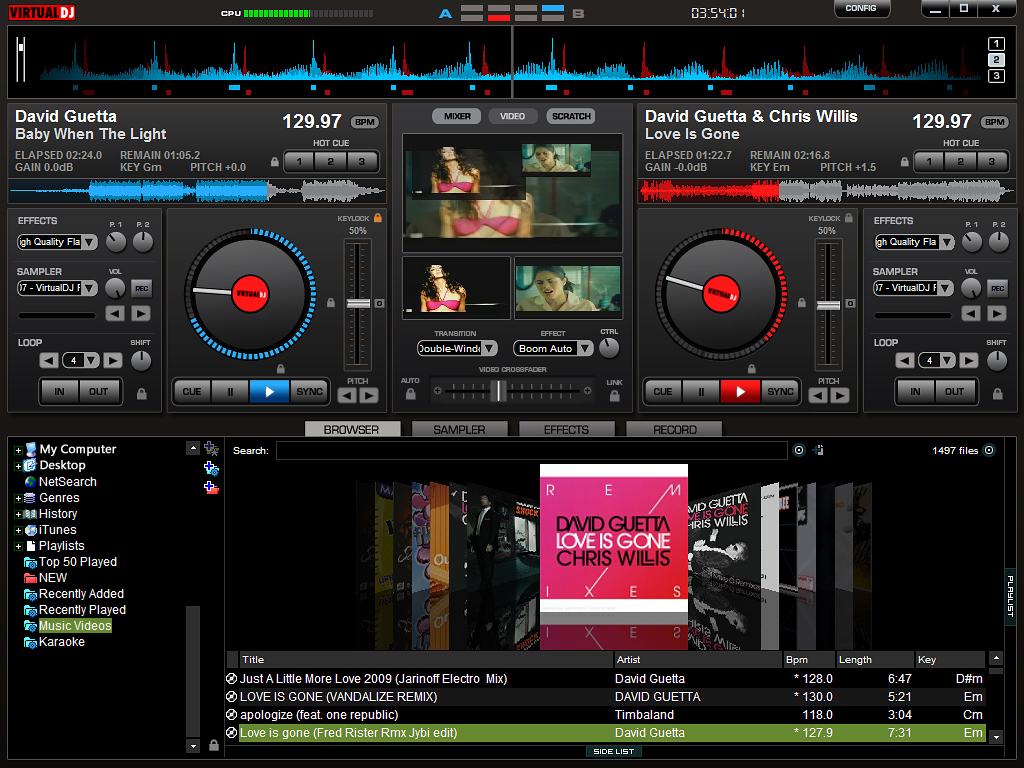
Do you like electronic music? Ever wanted to be as famous as the DJ on the radio? In the last few years digital deejaying’s popularity has grown. And that is not surprising because you can find a lot of software that can do even better than the very expensive DJ hardware. Plus its easier for basic users who just want to practice, to download one little program and start right away.

The most famous free deejaying program is Virtual DJ, developed by Atomix Productions. There is also the Pro version if you want to make really professional mixes, but the free version is great if you are aiming at basic tracks and playlists.
Once installed, Virtual DJ automatically populates a folder tree in the bottom left corner where you can easily access your music collection. The bottom middle serves as a tabbed, multifunction area where you can browse tracks, sample music bites, add effects, and make recordings.
The interface may look complex to you at first, but once you start working it will become very simple and easy to use. The top of the window is dominated by two digital turntables, which are distinguished by color: blue on the left and red on the right. Each one has the ability to cue, loop, adjust pitch, scratch, and shift (among other features). In the middle is the mixing console, where you can adjust the gain and master volume, as well as transition between the two tracks.
Once the songs have been dragged and dropped into the console, a bar along the top displays the sound waves of each to help with visual mixing. There’s also a video input option that lets you create montages to the music.

Download :- http://cnet.co/189e10

Microsoft Visual Studio 11 Developer Preview


Microsoft Visual Studio 11 Developer Preview

Microsoft Visual Studio is an integrated development environment that seamlessly spans the entire life cycle of software creation. Some of these software creation include; architecture, user-interface design, code creation, code insight and analysis, code deployment, testing and validation.

 This version adds support for the most advanced Microsoft platforms, including the next version of Windows (code-named “Windows 8″) and Windows Azure, and enables you to target platforms across devices, services and the cloud. Integration with Team Foundation Server allows the entire team, from the customer to the developer, to build scalable and high-quality applications to exacting standards and requirements.

Microsoft Visual Studio 11 Developer Preview enables you to test updates and improvements made since Visual Studio 2010. Some of these include the following: support for the most advanced platforms from Microsoft, which include Windows 8 as well as Azure, and a lot of other language enhancement; new features that include code clone detection, code review workflow, enhanced unit testing, lightweight requirements, production intelliTrace, exploratory testing, and fast context switching.
You can install this preview to run side by side with an existing Visual Studio 2010 installation. It also provides an opportunity.


Download : - Part 1 - http://bit.ly/opkdW
                         Part 2 - http://bit.ly/rkbQJH
                         Part 3 - http://bit.ly/pgLX6c

All In One Keylogger


All In One Keylogger


Do you want to see what other members of your family such as your kids are doing while online? If you do, then you will need a program to “spy” for you without being detected.

A good solution is All In One Keylogger by Relytec. You can monitor and record every word that was written in any language, every mouse click, talk and messages conversations, passwords, e-mails, clipboard, microphone sounds, captured screenshots, desktop, and online activity without slowing down the CPU! Also you have the option to block a website of your choice, so it can’t be viewed on the machine. If you worry about your kids staying safe online, it could be good peace of mind.

Now a good question – Is this program hidden from them? Short answer is YES, sometimes even you can forget that its running in the background. You have the ability to hide the taskbar icon, delete the Help file, and remove any Start menu icons and the uninstall list. Even an X-ray could not spot it!

To show the program again all you have to do is type the master password that the program requires you to create, on your desktop or any document, and the program appears. After that the collected data can be viewed by date, with each entry providing the user responsible for the action, the time stamp, and the active window.
All In One Keylogger has a 7-days trial period, only 4MB in size and with its simple interface it is great for beginners. There are many free to use programs, but if you want very good results, then try this one.

Download :- http://bit.ly/gpAVOE

HTMLPad 2011 11.1.0.128 Download


HTMLPad 2011 11.1.0.128


HTMLPad is an easy solution to web page coding. The program is compact, fast, easy to use and extremely powerful web document editor. HTMLPad not only allows you to take full control over your HTML code, but also speeds up the coding process, saving your precious time. The program has a user-friendly interface that makes it useful both for beginners and experts. The program has special features for HTML, CSS, JavaScript, VBScript, PHP, SSI, ASP, and Perl.
HTMLPad starts up quicker, and is really flexible; and has a lot of powerful features that allow you to create and edit HTML, XHTML, CSS and JavaScript code faster and easier than ever, while integrated tools enable you to validate, reuse, navigate and deploy your code in an efficient and sophisticated manner. The program also has a built-in CSS editor enables you to easily create and edit cascading style sheets of any size and complexity. Built-in JavaScript editor makes it easy to handle JavaScript.
HTMLPad contains a lot of quality features such as; one of the most complete HTML and XHTML editor, advanced, fully customizable and familiar text editor, HTML5 and CSS3 support, Syntax highlighting for HTML, CSS, JavaScript, VBScript, PHP, ASP, WML, XML, Perl, compliance with HTML, XHTML and various CSS standards, UTF-8 and UTF-16 Unicode support, Code Auto Complete for HTML tags, and many more.

Download : 
http://bit.ly/nPvIdk

Real Player Plus Full Pre-Activated

Real Player  Plus Full Pre-Activated! 


Real Player SP Plus Full Pre-Activated | 19.62 MB

RealPlayer is a media player produced by RealNetworks that is able to play a variety of multimedia formats (e.g. MP3, MPEG-4, QuickTime etc). First introduced to the world in April 1995, RealPlayer became one of the first media players capable of streaming media over the Internet.


New RealPlayer H.264 converter
120 minute DVD burning
10 band equalizer
Convert vinyl, tape and voice to digital files
Rip, mix and burn CDs and MP3s fast
RealPlayer SP Plus lets you take your media experience to the next level with our new RealPlayer H.264 video converter. It delivers the highest quality video available. There?s also 120?minute DVD burning. Of course, you get all the great features of the Free RealPlayer, too.
Receive RealPlayer Plus free with your free 14 day SuperPass trial.
Your SuperPass membership includes RealPlayer ? SP Plus, allowing you to play Web videos on your favorite devices, then share them on Facebook and Twitter.
See what they can?t show you on TV! Try it FREE.
Watch Full-Length Movies Now. SuperPass delivers online, on-demand movies.

How To Install
1. Install The Program
2. No Need For Activation ( Activated Before )
3. Enjoy

Download : -  http://bit.ly/oDBUag

Internet Download Manager [IDM] v6.07 • Incl Keygen


 Internet Download Manager [IDM] v6.07 • Incl Keygen

Image

Internet Download Manager : The fastest download accelerator 
Internet Download Manager (IDM) is a tool to increase download speeds by up to 500 percent, resume and schedule downloads. Comprehensive error recovery and resume capability will restart broken or interrupted downloads due to lost connections, network problems, computer shutdowns, or unexpected power outages. Simple graphic user interface makes IDM user friendly and easy to use.

Internet Download Manager has a smart download logic accelerator that features intelligent dynamic file segmentation and safe multipart downloading technology to accelerate your downloads. Unlike other download accelerators and managers that segment files before downloading starts, Internet Download Manager segments downloaded files dynamically during download process. Internet Download Manager reuses available connections without additional connect and login stages to achieve better acceleration performance.

Internet Download Manager supports proxy servers, ftp and http protocols, firewalls, redirects, cookies, directories with authorization, MP3 audio and MPEG video content processing, and a large number of directory listing formats. IDM integrates seamlessly into Microsoft Internet Explorer, Netscape, MSN Explorer, AOL, Opera, Mozilla, Mozilla Firefox, Mozilla Firebird, Avant Browser, MyIE2, and all other popular browsers to automatically handle your downloads. You can also drag and drop files, or use Internet Download Manager from command line. Internet Download Manager can dial your modem at the set time, download the files you want, then hang up or even shut down your computer when it's done.

Key features of Internet Download Manager:

* All popular browsers and applications are supported! Internet Download Manager supports all versions of popular browsers, and can be integrated into any 3rd party Internet applications.
* Download with one click. When you click on a download link in a browser, IDM will take over the download and accelerate it. IDM supports HTTP, FTP and HTTPS protocols.
* Download Speed. Internet Download Manager can accelerate downloads by up to 5 times due to its intelligent dynamic file segmentation technology.
* Download Resume. Internet Download Manager will resume unfinished download from the place where they left off.
* Simple installation wizard. Quick and easy installation program will make necessary settings for you, and check your connection at the end to ensure trouble free installation of Internet Download Manager
* Automatic Antivirus checking. Antivirus checking makes your downloads free from viruses and trojans.
* Advanced Browser Integration. When enabled, the feature can be used to catch any download from any application. None of download managers have this feature.
* Built-in Scheduler. Internet Download Manager can connect to the Internet at a set time, download the files you want, disconnect, or shut down your computer when it's done.
* IDM supports many types of proxy servers. For example, IDM works with Microsoft ISA, and FTP proxy servers.
* IDM supports main authentication protocols: Basic, Negotiate, NTLM, and Keberos. Thus IDM can access many Internet and proxy servers using login name and password.
* Download All feature. IDM can add all downloads linked to the current page. It's easy to download multiple files with this feature.
* Customizable Interface. You may choose the order, and what buttons and columns appear on the main IDM window.
* Download Categories. Internet Download Manager can be used to organize downloads automatically using defined download categories.
* Quick Update Feature. Quick update may check for new versions of IDM and update IDM once per week.
* Download limits. Progressive downloading with quotas feature. The feature is useful for connections that use some kind of fair access policy (or FAP) like Direcway, Direct PC, Hughes, etc.
* Drag and Drop. You may simply drag and drop links to IDM, and drag and drop complete files out of Internet Download Manager.
* IDM is multilingual. IDM is translated to Arabic, Bosnian, Bulgarian, Chinese, Croatian, Czech, Danish, Dutch, French, German, Hungarian, Italian, Japanese, Lithuanian, Macedonian, Polish, Portuguese, Romanian, Russian, Slovenian, Spanish, Thai languages.

What's new in version 6.07 :
* Added video stream recognition for several new web players
* Fxied a critical bug in 64bit versions of Windows

Multilingual: English, Spanish, French, Italian, Deustch, Japanese, Portugues, etc
Compatible with: Windows 95/98/Me/2000/NT/XP/2003/Vista/Server 2008/7 (32/64-bit)


Download : - http://bit.ly/pqUs6Q

Pc Purchasing Tips ;)


COMPUTERS

HARDWARE
Cases (Chassis)
CD-ROM drives
CPU
DVD drives
Flat Panel
Hard Drive
Memory
Monitor

Motherboard
Printer
-
Desktops
Servers

Introduction
Here are some Information and help on buying computers components hardware and software. This section of Computer Tips is designed to help all users to understand and make better decisions when purchasing computer hardware and software. There are some tips when you are ready to buy a computer for example: laptop computers

BUYING LOCATIONS
The first and important thing is to consider the buying location when purchasing a computer or computer equipment, software and hardware. There are many location to buy a computer but We have listed here some locations you will be able to purchase computer equipment or from and what to look out for. Please select one of the below locations you plan on purchasing from. cheap laptops
INTERNET
Internet is very easier, faster and cheaper way to buy computer hardware and software. Because a manufacturer provides you the detail information about its products, prices and where they are available for sale. A shop provides you a list of goods available, price of each item, that is why you can easily compare the price and quality of one company products to other company products. There are some tips when you are ready to buy a computer for example: Going with laptop computers can be a great choice especially if you engage in work while traveling.
LOCAL RETAILER
If your are not interested to buy a computer using internet then Local Retailer is one of the safest location to buy computer hardware and software. However the important issues to find a suitable shop for this purpose. So please first verify the return and warranty policy in case the device is not functioning or is not compatible with your computer.

#1]Tips On Buying A Desktop Computer


INTRODUCTION
A desktop personal computer is a most popular mode of personal computer. The system unit of the desktop personal computer can lie flat on the desk or table. In desktop personal computer, is usually placed on the system unit. A Purchasing a home or business computer can be a big and sometimes costly decision. It may be important to consider whether a laptop may be a better option instead, click to find out more about laptop deals. Below is a listing of helpful suggestions for what to look for and ask when purchasing a home or business computer new or used.
NEW vs. USED

Today there are two options to buy a computer, a new or used computer. Used computer are some time out of date, but you can buy it with very low price as compare to new computer, but I think branded or used computer are much stable than a new computer. Before purchasing a computer consider if you should purchase a new or used computer. Many individuals sell computer before they are out of date allow you to purchase a relatively decent computer. Before purchasing a new computer from a computer manufacture look at what is available and review the below precautions when purchasing a computer.
More Considerations
When purchasing a computer it is likely that you will have a general idea of what you may like in the computer or how you would like to configure the computer. Below is a listing of the various components likely to be found in a computer and recommendations and tips when considering any of the following components.


2]Tips On Buying Computer Monitors!

Introduction of Monitor

The monitor is a popular and most commonly used output device. Most monitors used in personal computers to display text, graphics, and video information. Due to different futures of monitor purchasing can be one of the most important task. Follow the some given steps to buying new or used monitor.
Technology of monitor
There are two basic types of monitors that are used with personal computer.
  • CRT monitors
  • Flat-Panel Monitors
when you are purchasing a monitor it is important to know, you need a CRT monitor or a Flat Panel monitor.
CRT Monitors. A CRT monitor is similar to standard television. Like televisions, CRT monitor size is measured diagonally, in inches, across the front of the screen. Today, CRT monitors are available in various sizes, i.e., 15, 17, 19, 21, and 22 inches. The large size monitors are more expensive and allow you to view more information on the screen at once.
Flat Panel / LCD. A flat panel monitor is also called LCD monitor. A flat panel monitor takes up less desk space and also consumes less power. Flat panel monitors are available with different sizes such as 15, 17, 18, 20, 21, and 23 inches. Flat panel monitors are commonly used in mobile devices such as laptop and table PCs. Similarly, smart phones, PDAs calculators have LCD screens.
There are two main categories of LCDs. These are
  • Active Matrix LCD
  • Passive Matrix LCD
Resolution
The quality of monitor screen depends on its resolution, which is generally proportional to the size of screen.
15" monitor typically has a resolution of 800 x 600 / 1,024 x 768
17" monitor typically has a resolution of 1,280 x 1,024
19" monitor typically has a resolution of 1,280 x 1024
21" monitor typically has a resolution of 1,600 x 1,200.
Once you have reviewed the appropriate information and believe that you are ready to make a purchase of a new monitor, ensure that the source which you plan on purchasing the monitor from is a reputable source and you have reviewed our section on what to look out for when purchasing over the Internet.
3]Tips On Buying A CPU / Processor!


INTRODUCTION
Processor is considered the brain of the computer. The CPU fetches instructions of program from main memory and executes them one by one. The speed of the CPU is measured in Mega Hertz or Giga Hertz and speed from 500 MHz to 3.4 GHz, it depends upon a user needs, that is why purchasing a processor is an important consideration when building or buying a computer. There are several considerations and additional information about what to ask and look for when purchasing a processor directly or already installed into a computer.

TYPE
The type of the processor can be very important consideration for users who are building a computer. The main thing in processor is the compatibility with the motherboard, Because the processor chip is plugged into the motherboard. Today there are many processor manufacturers AMD, Motorola and Intel. Final decision to buy a processor depends upon user need for example a home or basic user can buy Intel Celeron or AMD processor. If you can afford then must go for latest processor if you want your computer to retain functionality for four to six years. When considering any of the above companies product ensure that a motherboard that is compatible with that product is also purchased. For example if an Intel motherboard is purchased or currently installed into the computer you will want to consider an Intel Processor.

Hope! this Article help you 0ut ;)

Block Any Website On Your Computer


If you want to block certain websites on your computer without any software then this trick can  be very helpful to you.You can block any number of websites and if blocked they cannot be opened in any browser like google chrome,firefox,opera and Internet explorer.
For this trick we will edit the host file of the windows and will use the Ip address 127.0.0.1 (i.e localhost).Whenever somebody will try to open the blocked website the user will be redirected to local host.This trick works in windows xp,vista and windows 7
Here is the  Trick To Block Any Website On Your Computer
  • Open My Computer/Computer
  • Navigate to your Operating system drive (Usually C drive)
  • Now goto Windows –>System32–>drivers–>etc
  • Here you will see your Hosts file.Open this file with notepad.
  • Now move to the last line in this file and add the address of the website to be blocked prefixed by 127.0.0.1
For example In the screenshot below I have blocked google-analytics.com on my computer
01 sample hosts file Trick To Block Any Website On Your Computer
Remember that you should insert the Url of the blocked website with and without wwwprefix as shown in the above screenshot
Now Save the file.
Note:-You should open notepad with administrative privileges otherwise you won,t be able to save it

How To eliminate “Error Deleting File or Folder”


It is a very common and annoying message that the file or folder you are trying to deleted cannot be deleted or thependrive cannot be removed as it is used by the system.In this tutorial I will show how to remove your pendrive or delete the files and folders if you get such an error.This error has various flavours and it can be of any of the following types:
  • Cannot delete file: Access is denied
  • There has been a sharing violation.
  • The source or destination file may be in use.
  • The file is in use by another program or user.
  • Make sure the disk is not full or write-protected and that the file is not currently in use.
examplez How To Remove Error Deleting File or Folder
Here is the step by step tutorial with screenshots on How To Remove “Error Deleting File or Folder”
1.Download and Install Unlocker..Here To Download(837 kb) -> http://bit.ly/o7Z2Kj
2.Right click on the pendrive or file or folder that has to be removed or deleted.
tutorial1aj How To Remove Error Deleting File or Folder
3.Now,Click on the Unlocker
4.Now it will show all the processes that are using the file or folder or Pendrive.
5.Click on the Unlock All and you are done.Now you can delete the file or folder or remove the pendrive.
tutorial2f How To Remove Error Deleting File or Folder